Bring Structure to Employee Shifts, Rosters and Leave
Shift Timings • Duty Rosters • Leave Approvals • Comp-Off Workflows
Coordinate staff schedules, manage leave workflows and organise employee duties through CampusIRIS's connected HRMS processes designed specifically for educational institutions.
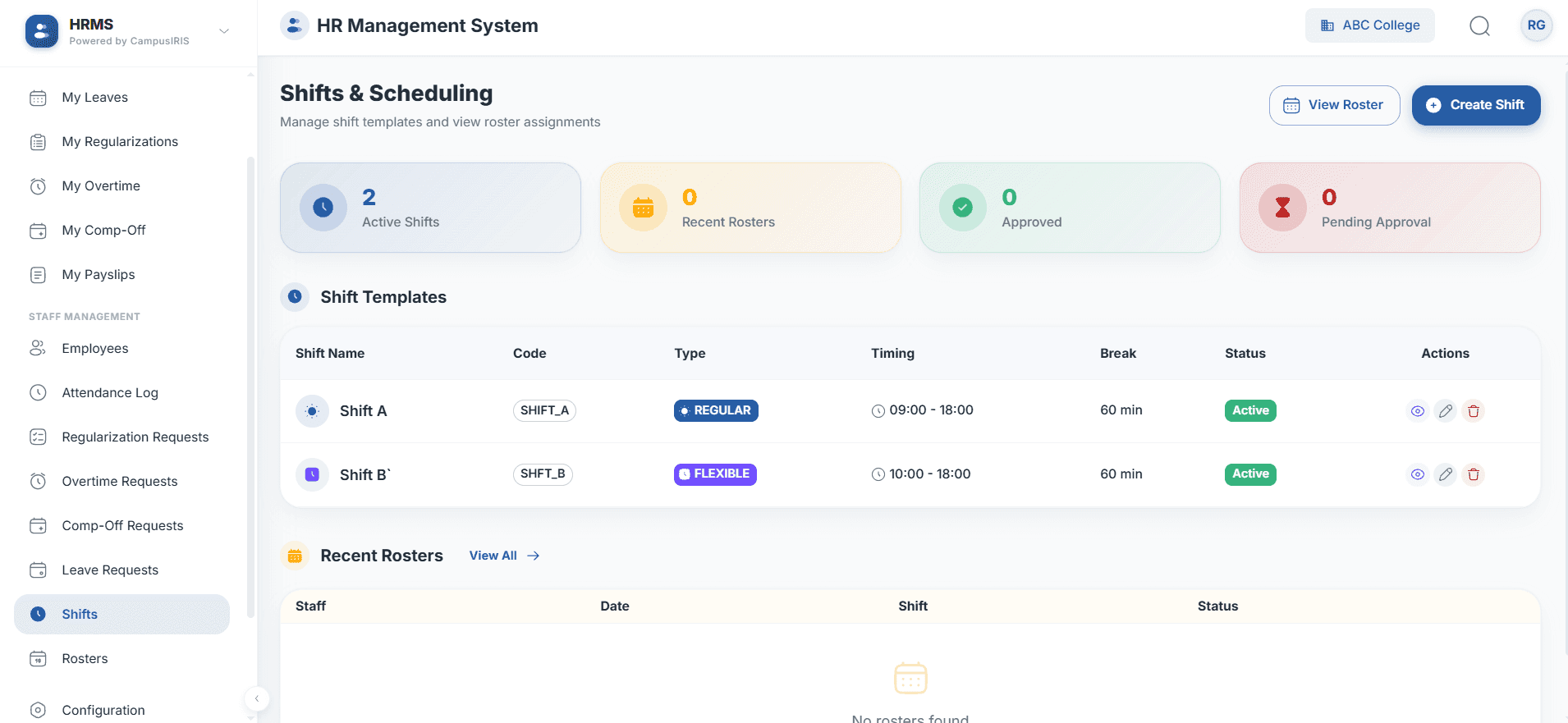
Flexible Shift Definitions for Academic & Administrative Personnel
Colleges, schools, and coaching centers require structured shift timings tailored to lecture periods, practical laboratories, and administrative counters.
Shift Definitions & Timings
Configure precise shift start and end times, grace period thresholds for arrival (e.g. 15 minutes), and minimum working hours required for half-day credits.
Department-Specific Shifts
Assign distinct shift types across departments: lecture shifts for degree faculty, afternoon practical slots for lab staff, and general shifts for administrative clerks.
Employee Shift Assignment
Assign individual staff members or entire departmental cohorts to active shifts, establishing baseline working expectations without scattered manual notes.
Shift Changes & Reassignments
Accommodate seasonal timetable adjustments, special campus duty schedules, or faculty shift exchanges with administrative reassignment workflows.
Shift-Based Attendance
Daily check-in and check-out logs evaluate against the assigned shift window, identifying late arrivals and half-days according to institutional rules.
Multiple Shifts Support
Easily handle morning lecture batches, afternoon labs, evening coaching shifts, and campus security rotations within the same institutional platform.
Shift Reports & Visibility
Generate shift distribution registers, punctuality logs, and department-wise shift coverage reports for academic deans and registrars.
Granular Role Permissions
Department HODs manage shifts only for their assigned faculty, while central HR retains administrative control across all campus branches.
Organise Staff Duty Rosters Across Departments
Plan weekly and monthly duty allocations for teaching faculty, laboratory assistants, and administrative staff on transparent rosters.
Employee-wise Duty Assignments
Map employees to daily duty rosters, specifying shift timings, lecture slots, and designated weekly offs for each day of the week.
- Day-by-day shift mapping
- Configurable weekly off designations
- Individual employee schedule views
Department-wise Rosters
Group duty rosters by academic faculty (e.g. Computer Science, Electrical Engineering) or administrative units for easy management.
- Departmental coverage oversight
- HOD schedule sign-off
- Term-based roster adjustments
Weekly & Monthly Views & Exports
Review duty schedules in weekly or monthly formats and export clean CSV/Excel files for department noticeboards.
- Weekly & monthly grid views
- CSV & Excel roster export
- Audit trail of roster modifications
Institutional Leave Policies & Approval Workflows
Digitize leave applications, automate quota balance tracking, and enforce transparent supervisor approval chains.
Configurable Leave Types
Set up institutional leave categories: Casual Leave (CL), Sick/Medical Leave (ML), Earned Leave (EL), Duty Leave (DL), and Maternity/Paternity Leave.
- Annual quota limits per leave head
- Carry-forward & encashment rules
- Academic Duty Leave tagging
Self-Service Application & Approval
Employees submit leave requests via web portal for review and recorded decision by their department head or administrator.
- Employee self-service submission
- Timestamped approval/rejection notes
- Lecture substitute arrangement notes
Live Quota Balance Ledgers
Real-time quota meters update immediately upon leave approval, giving employees and supervisors accurate visibility of remaining entitlements.
- Real-time quota balance deduction
- Entitlement vs utilized logs
- Annual leave audit reports
Campus Holiday Lists
Configure global institutional holidays, restricted leaves, and academic term breaks that overlay onto attendance calendars.
- Academic session holiday lists
- Term break holiday overlays
- Branch-specific holiday calendars
Compensatory Off (Comp-Off)
Allow staff to claim compensatory off credits for performing duties on weekends, admission counseling fairs, or campus events.
- Weekend duty logging & claims
- Supervisor validation workflow
- Time-bound comp-off redemption
Attendance & Payroll Alignment
Approved leaves protect employees from unauthorized absence marks on the muster roll, ensuring payable days calculate accurately for payroll.
- Muster roll status update upon approval
- Loss of Pay (LOP) unapproved absence tagging
- Exportable payroll attendance inputs
Shift & Leave Coordination for Every Educational Format
Configured specifically for higher education colleges, K–12 schools, and competitive coaching institutes across India.
Colleges & Universities
Coordinate teaching faculty shifts with classroom lecture hours and practical labs. Manage academic duty leaves for university evaluation, research conferences, and sabbatical periods.
Connected K–12 Schools
Organize morning school bell shifts for teaching staff (PGTs, TGTs, PRTs) and operational rosters for security guards, support personnel, and administrative office clerks.
Coaching & Test-Prep
Manage educator schedules across morning, evening, and weekend batch sessions. Coordinate traveling subject-specialist faculty between multiple center branches.
Connected Operational Workflow
A transparent sequence showing how shift definitions flow into duty rosters, leave requests, attendance reviews, and payroll inputs.
Frequently Asked Questions
Clear, factual answers regarding employee shifts, duty rosters, leave categories, comp-offs, and holiday calendars.
See Shift, Roster & Leave Management in Action
Submit your institutional requirements below. After submitting, you can choose a convenient 30-minute demonstration slot on our calendar.
Book Your Shift & Leave Management Demo
Walk through custom shift definitions, department duty rosters, leave balance ledgers, and holiday lists configured for your institution.
Explore Connected CampusIRIS Modules: