Simplify Payroll Operations for Your Institution
Salary Structures • Attendance Inputs • Deductions • Payslips
Organise employee salary information and payroll workflows through CampusIRIS's connected HRMS platform designed specifically for educational institutions.
Configurable Salary Structures for Academic & Support Staff
Model multi-tier salary components tailored to university faculty scales, administrative wage bands, and operational personnel.
Salary Structures
Create structured salary templates aligned with academic designations (Professors, Assistant Professors) and administrative cadres.
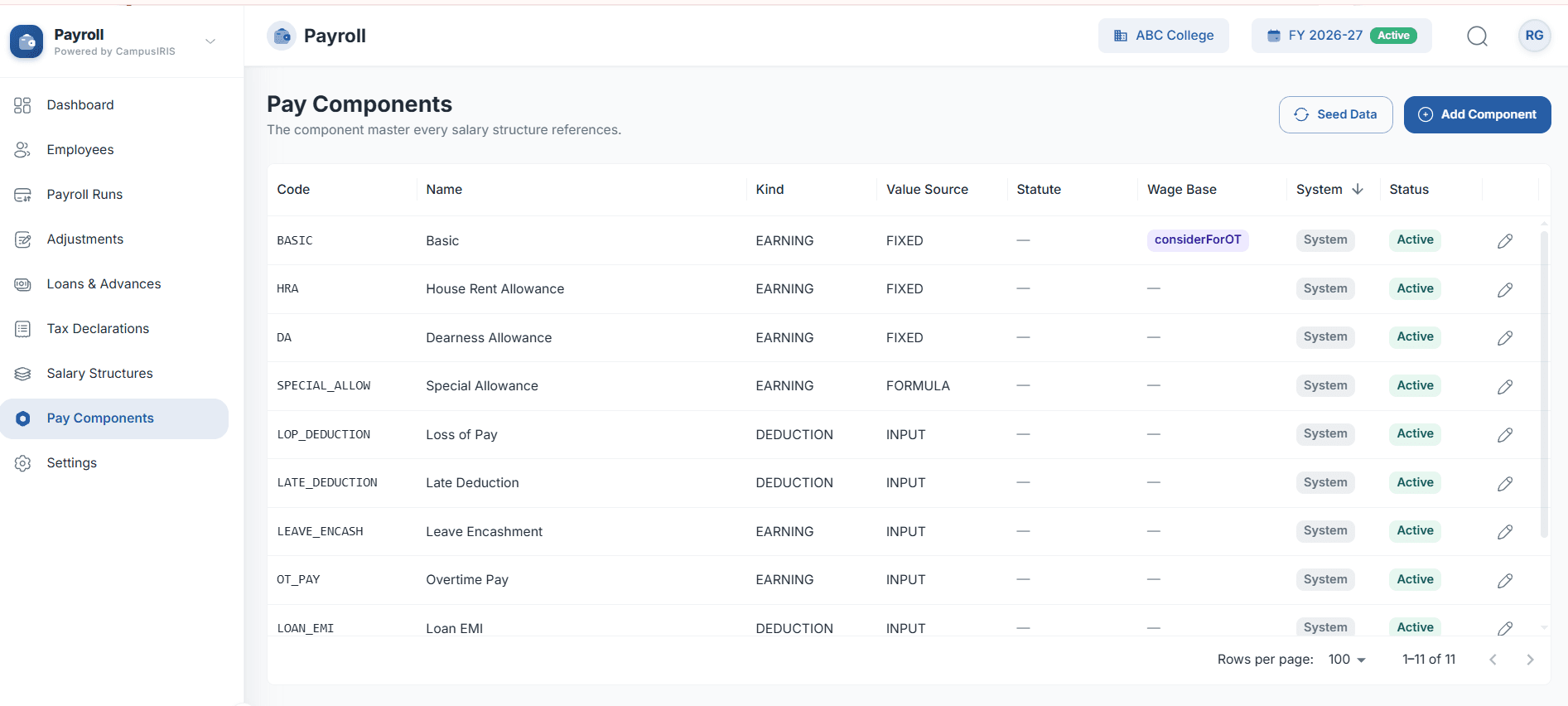
Earnings Components
Configure earnings heads: Basic Salary, Dearness Allowance (DA), House Rent Allowance (HRA), and academic research allowances.
Deduction Components
Set up statutory and institutional deduction heads: Provident Fund (PF), ESI, Professional Tax (PT), TDS, and staff loan repayments.
Employee Salary Assignment
Assign customized structures to individual employees with defined base amounts, component percentages, and effective dates.
Effective Dates & Revisions
Maintain complete historical records of annual salary increments, promotion pay revisions, and component adjustments.
Payroll Period Configuration
Configure standard monthly payroll periods (e.g. 1st to 30th/31st of each calendar month) to align with institutional accounting.
Salary Records & Archives
Access past salary assignment histories across academic sessions for institutional audits and staff verification requests.
Confidentiality & RBAC
Strict role-based permissions ensure that only authorized bursars and finance officers can view or edit sensitive salary information.
End-to-End Monthly Payroll Processing
Follow a disciplined administrative sequence from payroll period creation to draft calculations, review, approval, and payslip distribution.
1. Payroll Period & Batch Selection
Initialize the monthly payroll cycle. Select all employees or filter cohorts by academic department, designation, or employment category.
- Department-wise batch selection
- Monthly calendar cycle definition
- Batch creation for regular vs ad-hoc staff
2. Salary Computation & Review
The system generates draft salary slips pulling assigned structures, verified attendance days, and Loss of Pay (LOP) deductions for review.
- Attendance-adjusted salary calculations
- Configured deduction tracking (PF, ESI, PT, TDS)
- Administrative review & manual adjustments
3. Approval, Payslips & Exports
Upon authorized bursar approval, the payroll batch is locked, individual PDF payslips are generated, and bank disbursement registers exported.
- One-click batch approval & lock
- Downloadable PDF employee payslips
- Bank NEFT / RTGS payout file export
Attendance & Leave Inputs in Payroll Calculations
How verified attendance muster rolls and approved leave records feed directly into monthly salary determinations.
Verified Payable Days
Total calendar days are evaluated against attendance logs. Present days, weekly offs, and institutional holidays count as verified payable days.
Approved Leave Adjustments
Approved leaves (Casual Leave, Medical Leave, Earned Leave, Duty Leave) are credited as paid working days and do not deduct salary.
Loss of Pay (LOP) Deductions
Unapproved absences or unpaid leaves result in pro-rata salary deductions based on institutional loss-of-pay calculation rules.
Statutory Component Configuration & Reports
Configure standard Indian salary deduction heads on employee profiles with complete transparency regarding system capabilities.
Provident Fund (PF)
Configure employee (12%) and employer contribution rates, apply statutory wage ceiling rules, and generate monthly PF deduction statements.
Employee State Insurance
Configure ESI percentage rules (0.75% employee, 3.25% employer) for eligible staff within applicable gross wage thresholds.
Professional Tax (PT)
Configure state-specific monthly salary deduction slabs applicable to your institution's physical campus location.
Tax Deducted at Source
Incorporate monthly income tax (TDS) deduction amounts on employee salary structures and track annual cumulative deductions.
CampusIRIS supports the configuration, calculation, and reporting of salary components and statutory deduction heads on monthly payroll registers. CampusIRIS does not provide legal or tax advisory services, automatic government portal e-filings (such as EPFO or ESIC portal uploads), or guaranteed statutory compliance across jurisdictions. Institutional finance and accounts teams remain responsible for verifying statutory applicability, tax interpretation, and submitting official returns to government portals.
Payroll Processing for Every Educational Sector
Configured specifically for higher education colleges, K–12 schools, and competitive coaching institutes across India.
Colleges & Universities
Manage complex academic payroll structures (Professors, Associate Professors, Assistant Professors), research allowances, visiting faculty stipends, and department-based cost centers.
K–12 School Payroll
Process monthly salaries for teaching staff (PGTs, TGTs, PRTs) alongside non-teaching teams (administrative staff, security, housekeeping) with vacation pay adjustments.
Coaching Faculty Remuneration
Organize monthly salary structures for subject-specialist educators, academic counselors, and center operational teams across multiple branch locations.
Connected Operational Pathway
How employee records, shift rosters, and attendance inputs culminate in finalized payroll registers and financial accounting.
Frequently Asked Questions
Clear, factual answers regarding salary structures, monthly payroll processing, attendance adjustments, and statutory components.
See CampusIRIS Payroll Management in Action
Submit your institutional requirements below. After submitting, you can choose a convenient 30-minute demonstration slot on our calendar.
Book Your Institutional Payroll Management Demo
Walk through custom salary structures, attendance-linked payroll calculations, payslip generation, and bank payout files.
Explore Connected CampusIRIS Modules: