Build and Manage Academic Timetables
with Greater Control
Organise classes, subjects, faculty and academic schedules through a structured timetable management workflow.
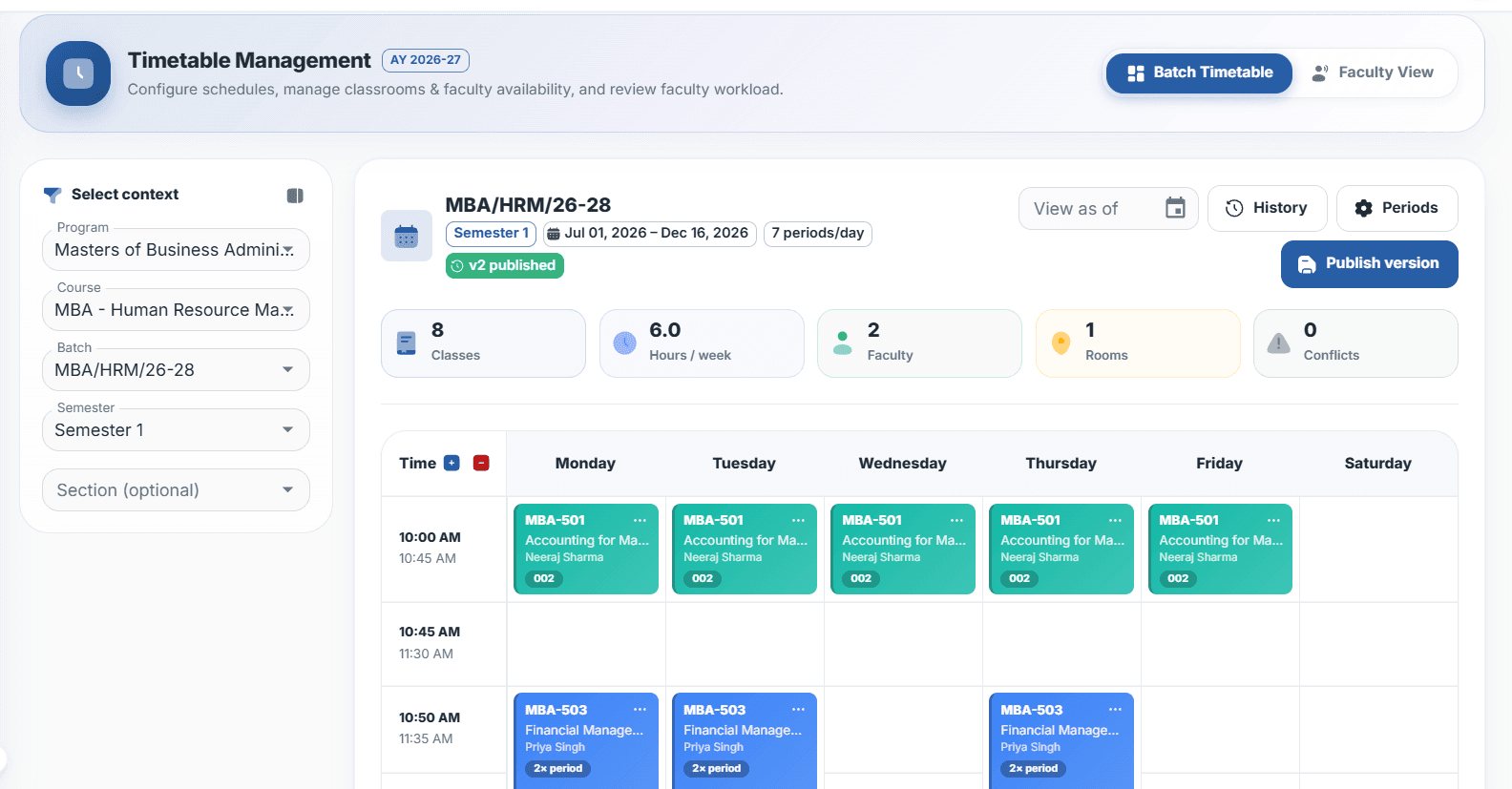
Operational Notice: Structured weekly schedule matrix configuration, faculty slot mapping, and room allocation checks are configured by institutional administrators based on their term calendars and classroom availability.
The Architecture of an Academic Schedule
Timetable compilation requires orchestrating four distinct resources simultaneously: students, faculty, classrooms, and time slots.
Time Slot Templates
Configure daily period blocks (e.g. 50-minute lectures, 100-minute lab blocks) with defined morning, lunch, and break intervals.
Class & Batch Allocations
Map master schedules to specific section batches, ensuring every cohort has an orderly, predictable academic week.
Faculty Period Assignments
Assign educators to their mapped subjects and classes to balance departmental teaching rosters and track weekly contact hours.
Classroom & Lab Mapping
Tag physical lecture halls, seminar rooms, and computer/engineering labs to specific time slots to optimize infrastructure usage.
| Day | Period 1 (09:00 - 10:00) | Period 2 (10:00 - 11:00) | Period 3 (11:15 - 12:15) | Period 4 (01:00 - 03:00) |
|---|---|---|---|---|
| Monday | Data Structures (Room 101) | Operating Systems (Room 101) | Mathematics III (Room 101) | DS Lab (Lab 204) |
| Tuesday | Operating Systems (Room 101) | Computer Networks (Room 101) | Data Structures (Room 101) | Networks Lab (Lab 202) |
| Wednesday | Mathematics III (Room 101) | Data Structures (Room 101) | Digital Electronics (Room 101) | Tutorial & Mentoring |
| Thursday | Computer Networks (Room 101) | Operating Systems (Room 101) | Elective I (Auditorium) | Electronics Lab (Lab 105) |
| Friday | Data Structures (Room 101) | Mathematics III (Room 101) | Operating Systems (Room 101) | Library & Seminar |
Schedule Organization & Resource Allocation
When creating timetables, academic coordinators need structured views to organize faculty assignments, laboratory bookings, and student batch periods.
Faculty Period Allocation
Structured time matrices display instructor commitments across sections to help deans assign teaching hours clearly.
Classroom & Lab Mapping
Map physical lecture halls, seminar rooms, and computer laboratories to specific time slots across batches.
Batch Schedule Consistency
Organize section batches with consistent recurring time slots and clear subject groupings throughout the academic week.
Administrative Schedule Organization
CampusIRIS provides structured timetable grids that help academic coordinators organize faculty hours and room allocations before schedules are published.
Personalized Timetable Views for Every Stakeholder
Different campus members need different perspectives on the master schedule.
Faculty Personal View
Educators view their personal weekly lectures, free preparation periods, and assigned classrooms directly on their faculty dashboard.
Student Portal Access
Enrolled students view their daily section timetable, lab sessions, and subject teachers through their web self-service desk.
Printable PDF & Notice Boards
Export high-resolution printable PDF timetable grids formatted for classroom door display, department notice boards, and registrar archives.
Scheduling Workflows for Every Segment
How timetables function across higher education, K-12 schooling, and competitive coaching.
Colleges & Universities
Semester lecture blocks, specialized computer and science laboratory periods, elective course clashes avoidance, and faculty workload balance.
K–12 Schools
Weekly fixed period structures, homeroom class teacher allocation, games, arts, and library period distribution across classes 1 through 12.
Coaching Institutes
Target subject lectures, regular and weekend test series slots, evening batch shift allocations, and faculty rotation schedules across centers.
Explore Timetable Management for Your Institution
CampusIRIS coordinates class periods, lecture shifts, classroom room allocations, and faculty rosters across all campus formats.
College ERP Software
Multi-semester course timetables, elective subject schedules, lab slot reservations, and faculty workload balancing.
Connected School ERP
Grade and section weekly period grids, teacher substitution management, bell schedule alignment, and classroom allocation.
Coaching Institute ERP
Morning, evening, and weekend batch scheduling, faculty lecture rotations across centers, and room capacity optimization.
Connected Modules inside CampusIRIS:
Frequently Asked Timetable Questions
Concise explanations regarding academic timetable structures, scheduling workflows, and faculty period planning.
What is timetable management software?
Timetable management software is an educational planning platform that enables colleges, schools, and coaching institutes to schedule weekly classes, map faculty lecture slots, assign classrooms, and organize student periods into a cohesive, structured academic calendar.
How does an academic timetable system work in CampusIRIS?
Administrators define daily operating periods, lecture durations, and recess intervals. Subjects and qualified faculty are mapped to specific time slots across section batches to establish structured weekly academic rosters.
How can institutions manage faculty scheduling and workload?
CampusIRIS associates faculty members with their specific courses and subjects. In the faculty view, educators can view their weekly schedule, open periods, and assigned lecture halls, helping academic deans organize teaching loads across departments.
What are common timetable scheduling challenges, and how are they addressed?
Common scheduling challenges include tracking faculty commitments across multiple sections, organizing shared laboratory spaces, and balancing student lecture sequences. Structured period grids provide administrators with clear visibility across batches, classrooms, and faculty assignments to help organize schedules methodically.
Can students access their timetable online?
Yes. Enrolled students can view their daily and weekly class timetables, assigned room numbers, and subject teachers directly through their personal student portal.
Streamline Timetable Scheduling for Your Campus
Speak with our education specialists to explore how CampusIRIS helps educational institutions build orderly, well-structured academic timetables.